Saturation & compression · AU · VST3

One knob.
All the density.

BellaSat is a saturation and compression plugin with a single knob that does the work. Turn it up and your sound gets warmer, thicker and more present — no chain of plugins, no wall of controls, no phase problems.

Apple Silicon  ·  macOS 11 or later  ·  14-day free trial  ·  $59 once, no subscription

Audio UnitVST3Zero latency
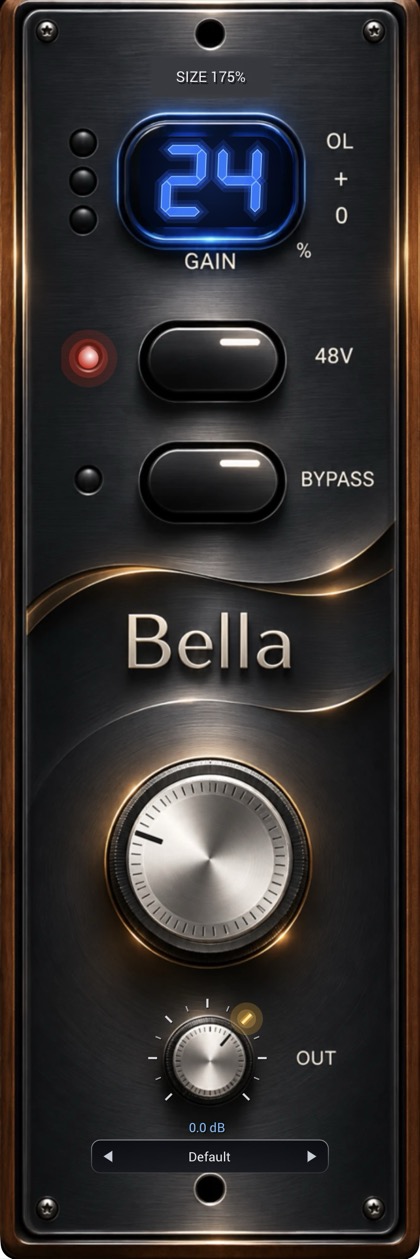
The BellaSat plugin: dark brushed-metal faceplate with a glowing blue gain display, 48V and Bypass buttons, one large knob and a small output knob

The sound

BellaSat is voiced to make things feel bigger without making them harsh. It does three things at once, and you never have to think about any of them.

Warmth

Round, harmonic saturation

A soft-knee saturation stage rounds off the edges and adds rich harmonics. Thin sounds gain body; bright sounds get smoother, never fizzy.

Glue

Compression that tightens

A musical, fast-acting compressor pulls the dynamics together so a part sits forward and stays there. Drums feel heavier. Bass feels steadier. Vocals feel closer.

Control

Dense, but under control

Peaks are caught at full scale, so BellaSat adds weight and loudness without overloading what comes next. Use the output trim to level-match and compare honestly.

24%
0% · your sound, untouched100% · the full BellaSat voice
10–25%Weight and presence. You feel it more than you hear it.
30–60%Clear density and glue. The sweet spot for most sources.
70–100%All in: thick, loud, unmistakable.
The one knob

Everything BellaSat does lives behind one dial.

It is a parallel blend between your clean signal and the fully processed BellaSat voice. At 0% you hear your track exactly as it was. At 100% you hear the full sound. Everywhere in between, you keep your transients and your tone and layer the weight on top.

That is the trick: one move replaces what would normally take a saturator, a compressor, a blend control and some gain staging. And because the clean and processed signals are perfectly time-aligned, with zero latency, blending never smears and never phases — it only adds.

The glowing readout shows exactly where you are, from 0 to 100. Drag the knob, drag the display, or scroll over it. Hold Shift for fine control. When you find a setting you love, save it as a preset.
Small on purpose

Everything else on the faceplate is there because it earns its place.

Button

48V

Switches in a tighter, faster-grabbing compression character for sources that need to be held down harder. Off for natural, on for more bite and control.

Button

Bypass

A click-free, glitch-free A/B. Hear what BellaSat is doing, and what you would miss without it.

Knob

Output trim

−24 to +12 dB, with a printed scale and a gold light on the tick you are pointing at, plus a live dB readout.

Presets

Save your own

Step through presets with the arrows, or save, overwrite and delete your own from the menu. They are plain files you can back up and share.

Meter

OL, + and 0

Three lights show your output level at a glance, from a healthy signal to hitting full scale.

Size

100% to 175%

Pick the window size that suits your screen. BellaSat remembers it with your session.

Specs

Native, light and ready for a full session.

FormatsAudio Unit · VST3
PlatformmacOS 11 or later, Apple Silicon (M1 or newer)
ChannelsStereo (mono sources work too)
Sample rates44.1 kHz to 192 kHz
LatencyNone (0 samples)
CPU useVery low
ControlsGain 0–100% · 48V · Bypass · Output −24 to +12 dB
ValidationPasses Apple’s auval for Audio Units

Simple pricing

One plugin, one price.

$59
one-time purchase · no subscription
Buy BellaSat · $59

Already bought? Forgot your license key?  ·  Questions: info@l4music.com

Questions

The short answers.

What does the knob actually do?

It sets how much of the processed BellaSat sound is blended in with your clean signal. 0% is your sound untouched, 100% is the full effect. The blend is time-aligned, so there is no phasing between the two.

Will it make my track louder?

Yes, as you turn it up the track gets denser and louder. Use the output trim (down to −24 dB) to level-match when you compare, so you are judging the sound and not the volume.

What does 48V do?

It switches in a faster, tighter compression character. It is a subtle change on gentle material and more noticeable on dynamic sources like drums. Try it on and off.

How does the free trial and licensing work?

Download and use BellaSat free for 14 days, fully working. After that, enter a license key to keep using it (without one, BellaSat simply passes your audio through untouched). One license covers 2 of your Macs, and you can move it from one Mac to another by deactivating it first. Lost your key? Use “Forgot your license key?” in the pricing section.

Does it add latency?

No. BellaSat reports zero latency, so you can use it on any track, live or in the mix, without compensation.

Which Macs and DAWs does it work with?

Apple Silicon Macs (M1 or later) on macOS 11 or later. It installs as an Audio Unit and a VST3, so it works in any DAW that hosts either format. Intel Macs and Windows are not supported at this time.

Can I use it on mono tracks?

Yes. BellaSat is a stereo plugin and handles mono sources without trouble.

Where are my presets stored?

In ~/Library/Application Support/BellaSat/Presets, one small text file per preset. Copy them to another Mac to take your presets with you.

Can I resize the window?

Yes. Click the size label at the top of the plugin and choose 100%, 125%, 150% or 175%.

One knob. Turn it up.

Give every track the weight and glue it has been missing.

Buy BellaSat · $59